

Welcome to Bike Yard — Australia’s Lead Generation Platform for Bike ShopsVersion 1.2 | December 2025
What is Bike Yard?
Bike Yard is a platform that connects bike shops with buyers actively searching for bikes. Unlike marketplace sites, Bike Yard is a lead generation platform — buyers browse your listings and contact you directly. No transaction fees, no commissions, just quality leads.Key Benefits for Your Shop
We’re Building This For YouBike Yard is in active development and exists to help local bike shops sell more bikes. We welcome your suggestions for features and improvements — the Bike Yard team wants to make things easier for you as a bike shop owner. Email us anytime at support@bikeyard.com.au
Getting Started
Step 1: Sign Up for a Subscription
Visit bikeyard.com.au/join to choose your plan:Bike Yard Lite
$80/month
- Up to 10 bike listings
- Bike specs data via 99 Spokes
- Direct customer enquiries
- Shop profile page
- Performance analytics
- Email support
Bike Yard Pro
$120/month
- Up to 200 bike listings
- Bike specs data via 99 Spokes
- Direct customer enquiries
- Shop profile page
- Advanced analytics
- Priority support
Step 2: Set Up Your Shop Profile
Your shop profile is what buyers see when they click on any of your listings. A complete profile builds trust and drives more enquiries. Required Information:- Shop name
- Contact phone number
- Email address
- Street address, suburb, state, postcode
- Shop website URL
- Opening hours
- Shop description/bio
- Shop logo
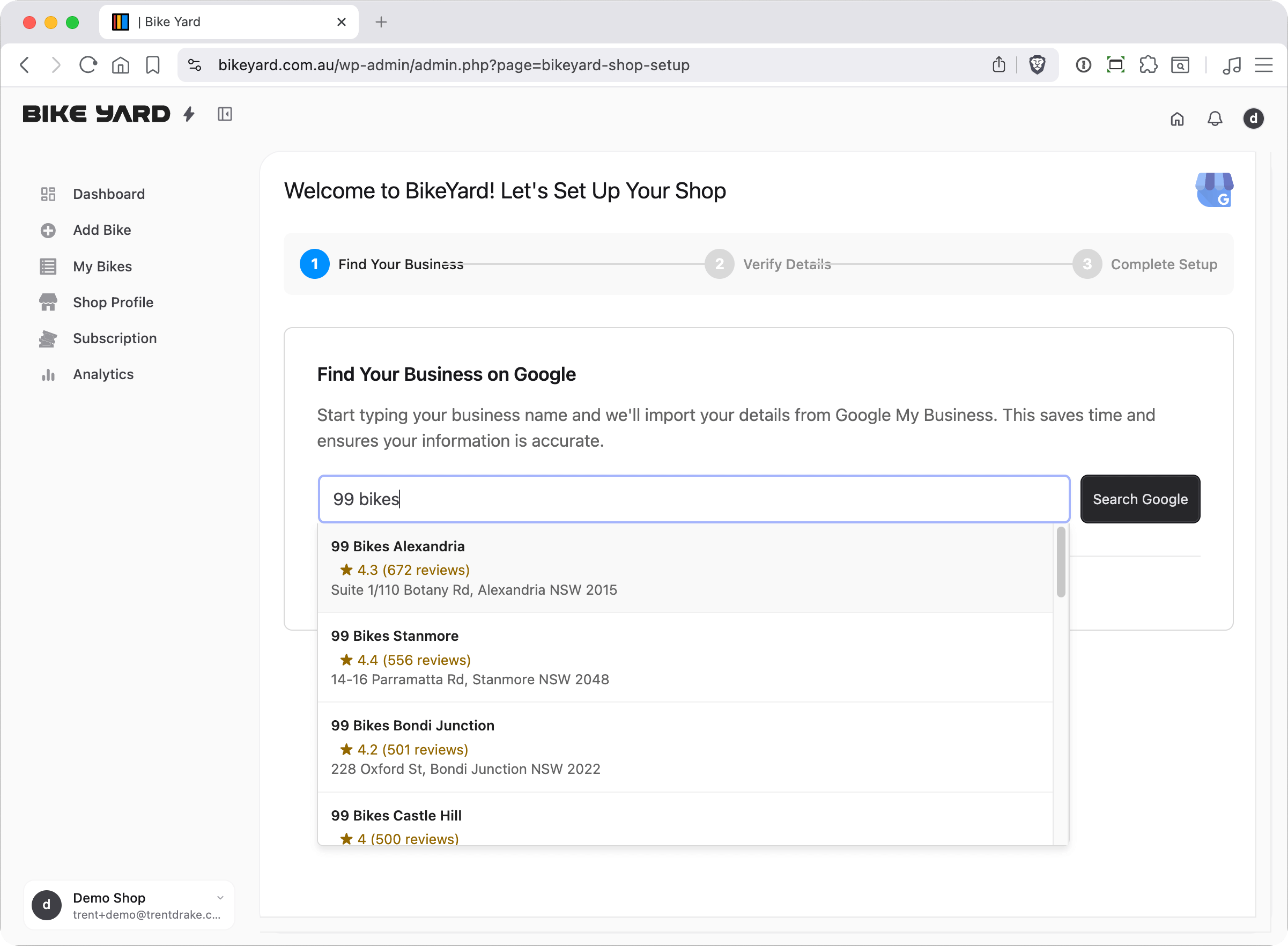
How to Import from Google My Business
1
Go to Shop Profile
Navigate to your Shop Profile page in the dashboard
2
Find the Import Section
Look for the “Import from Google My Business” section
3
Search for Your Shop
Type your shop name and click “Search”
4
Select Your Shop
Click on your shop from the search results
5
Review Imported Details
Your details (including Google rating!) will be auto-filled
Step 3: Add Your First Bike
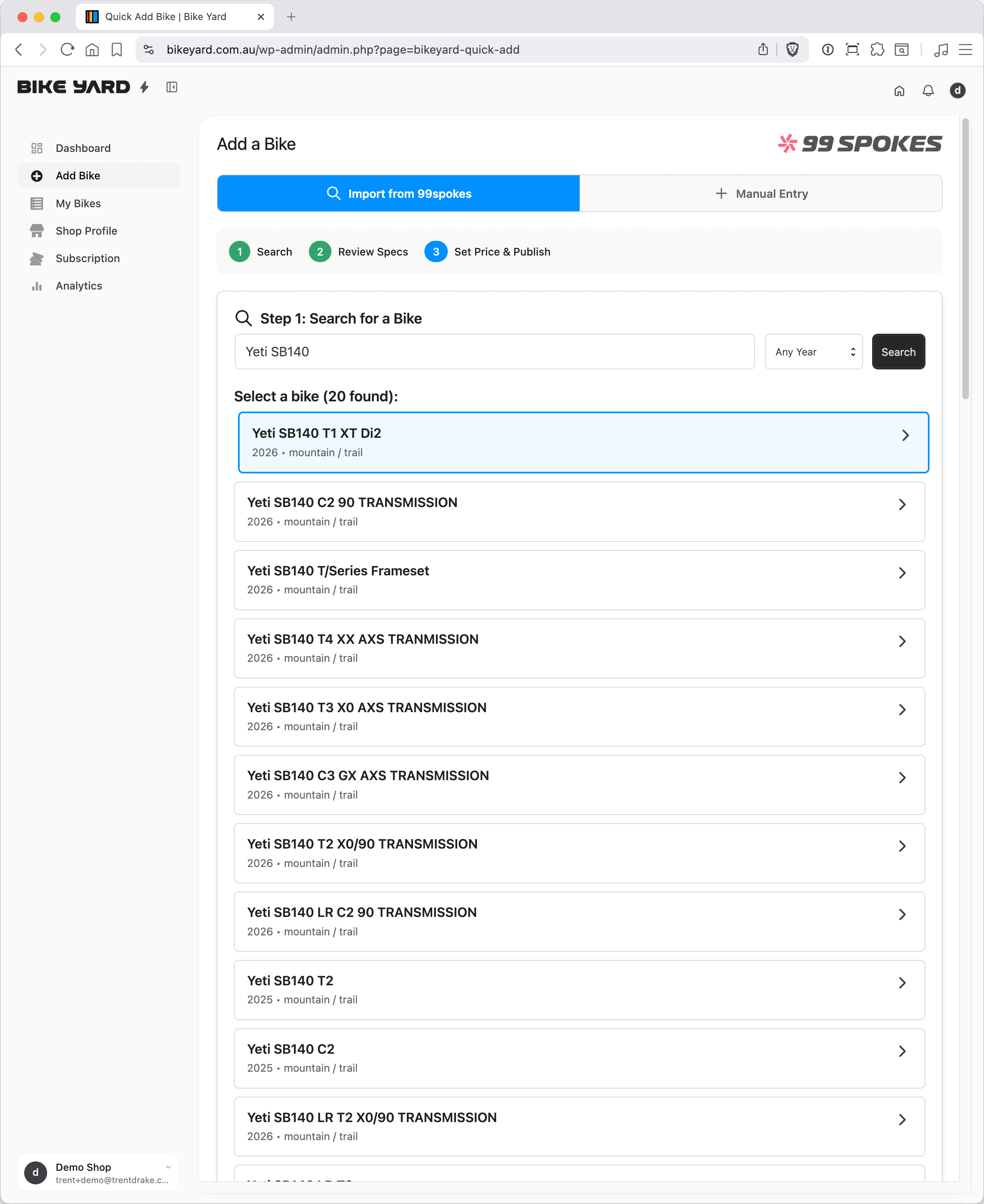
This is where Bike Yard shines. Adding a bike takes 1 minute or less using our 99spokes integration.Quick Add Process
1
Search
Type the bike brand and model (e.g., “Specialized Tarmac” or “Giant Defy”)
2
Select
Click on the correct bike from the search results
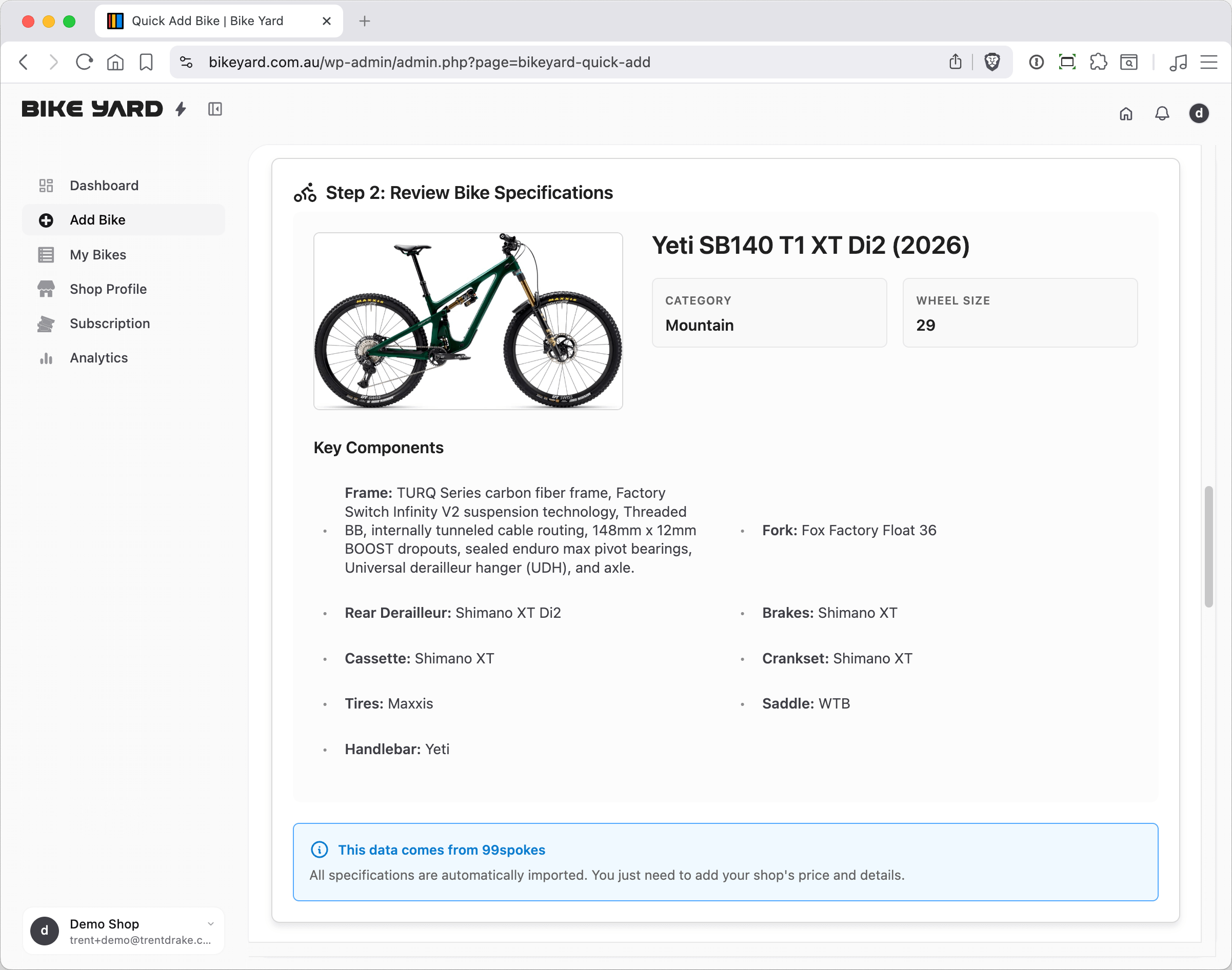
3
Review
Check the auto-populated specifications
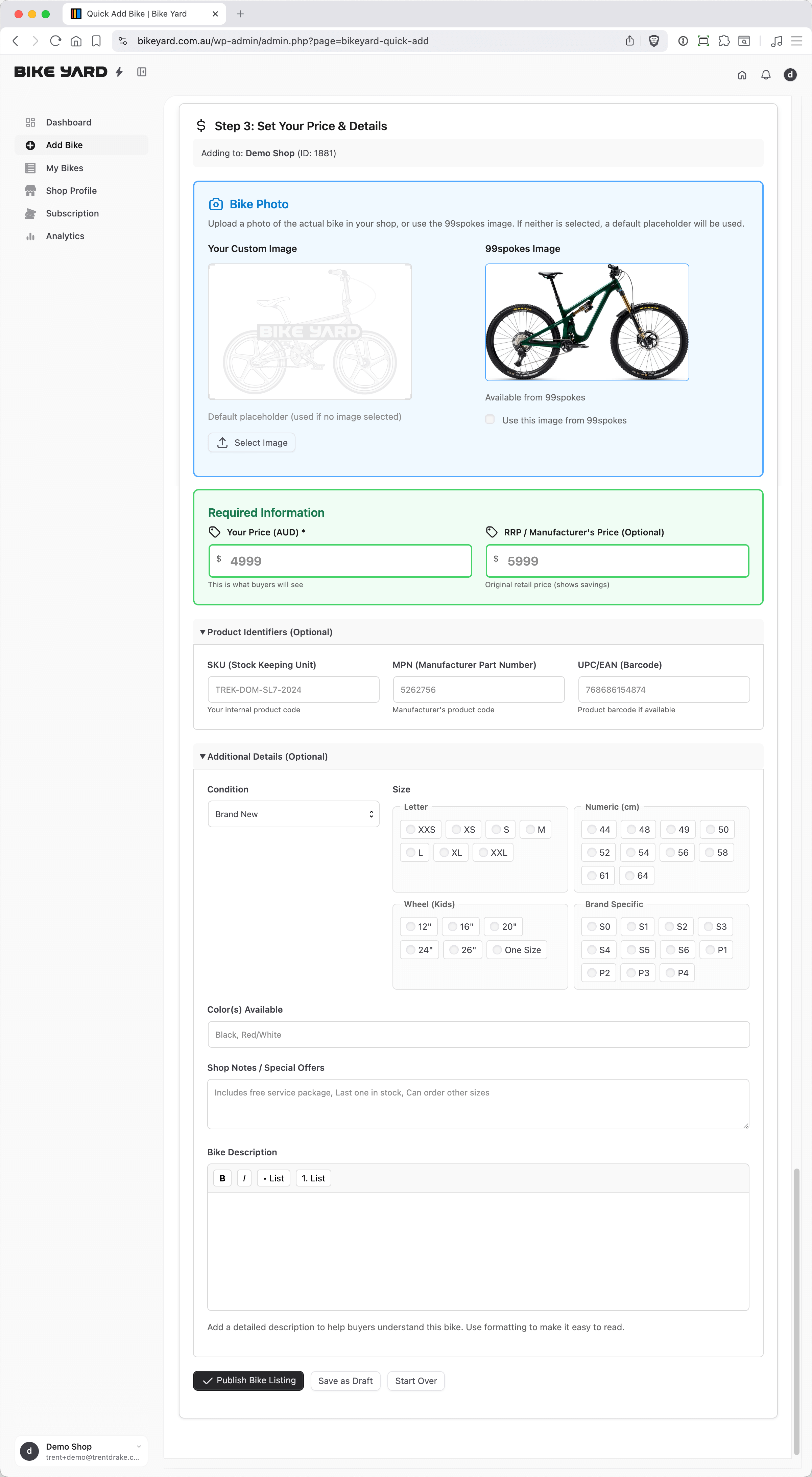
4
Price
Enter YOUR selling price, size, and colour
5
Publish
Click “Publish Bike Listing”
One Listing Per Bike
Each physical bike you have in stock needs its own listing on Bike Yard. This means:- Multiple units of the same model — each one gets its own listing
- Same model in different sizes — each size gets its own listing
- Same model in different colours — each colour gets its own listing
Managing Your Listings
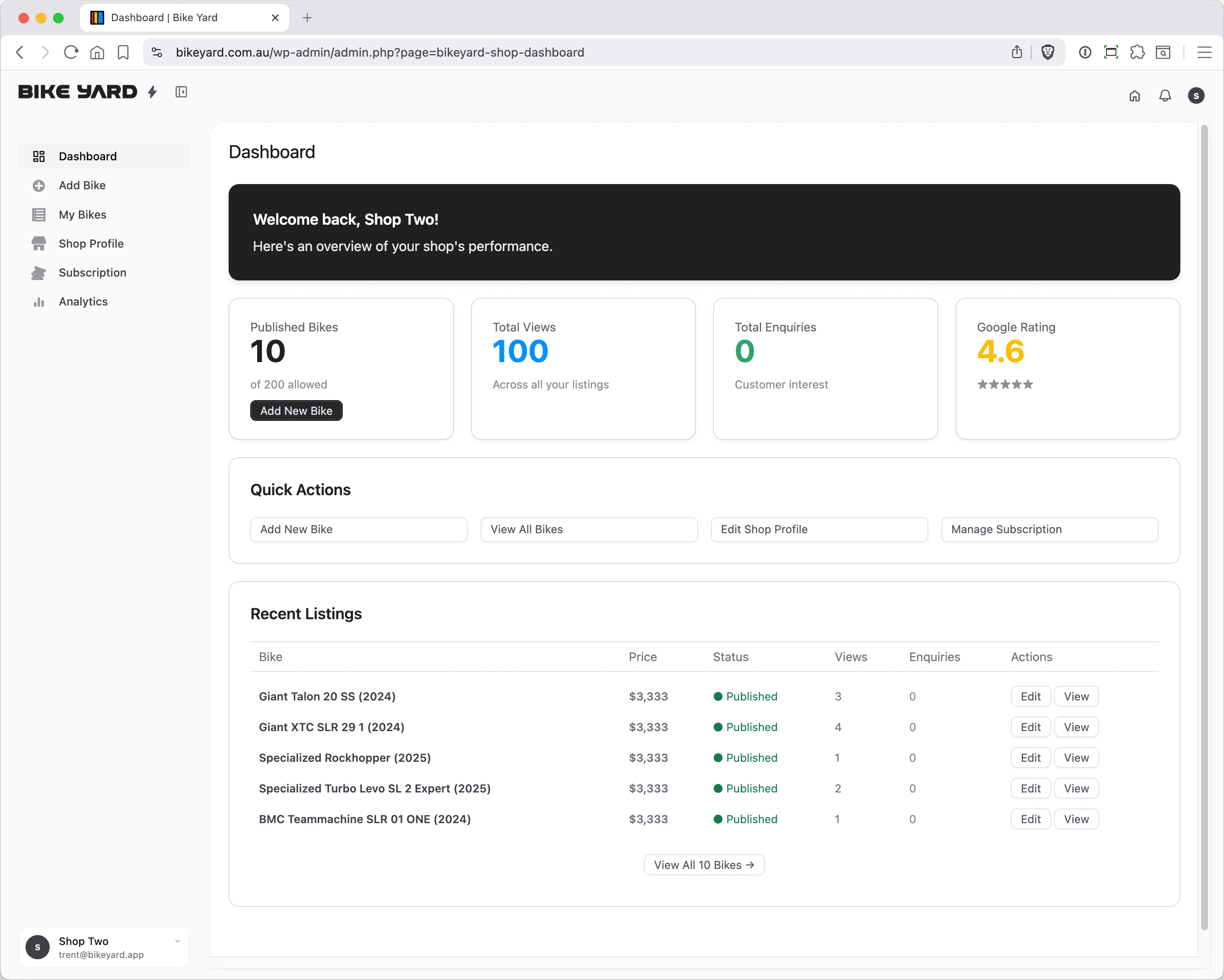
Your Dashboard
Your dashboard gives you a quick overview of:- Total active listings
- Recent views across all bikes
- Recent enquiries
- Quick links to add/manage bikes
My Bikes
View all your listings in one place:- Status — Published, Draft, or Sold
- Views — How many times each bike has been viewed
- Enquiries — Number of contact requests received
- Actions — Edit, duplicate, or mark as sold
Duplicating a Listing
Got multiple units of the same bike? Here’s how to quickly duplicate a listing:1
Go to My Bikes
Navigate to your My Bikes page
2
Find the Listing
Locate the listing you want to copy
3
Click Duplicate
Click the Duplicate button
4
Edit the Copy
A new draft listing is created with “(Copy)” in the title. Update the size, colour, price, or add photos
5
Publish
Click Publish when ready
Editing a Listing
Need to update a price or mark a bike as sold?- Go to My Bikes
- Find the listing you want to edit
- Click Edit
- Make your changes
- Click Update
Listing Best Practices
Do's ✓
- Create one listing per bike
- List bikes you have in stock
- Keep prices current
- Use the duplicate feature for multiple units
- Use accurate descriptions
- Respond quickly to enquiries
Don'ts ✗
- List bikes you can’t supply
- Use as general advertising
- Leave sold bikes as “In Stock”
- Ignore enquiries
- Put multiple sizes in one listing
Understanding Your Analytics
Views
Every time a buyer views your bike listing, it counts as a view. High views but low enquiries? Consider:- Is your price competitive?
- Is your description complete?
- Are your shop details filled in?
Enquiries
When a buyer submits an enquiry form or clicks to call/email, it’s tracked as an enquiry. This is your key metric — enquiries are leads that can convert to sales.Conversion Tips
- Respond to enquiries within 2 hours if possible
- Include all relevant information in your listings
- Keep your shop phone answered during business hours
- Have your team aware that Bike Yard leads are coming in
Bike Boost (Optional)
Want extra visibility for a specific bike? Use Bike Boost:- $20 for 14 days of featured placement
- Bike appears in “Featured Bikes” section
- Higher visibility in search results
- Available on any listing
Getting Help
Support Resources
- Email: support@bikeyard.com.au
- Help Centre: bikeyard.com.au/help
- FAQs: bikeyard.com.au/faq
Common Questions
Can I import bikes from my existing inventory system?
Can I import bikes from my existing inventory system?
Currently, bikes are added individually via 99spokes search. Bulk import features are planned for future release.
What happens when my subscription expires?
What happens when my subscription expires?
Your listings will be hidden from search results but not deleted. Renewing your subscription will restore them.
Can I have multiple staff members managing listings?
Can I have multiple staff members managing listings?
Currently, one login per shop. Multi-user access is on our roadmap.
What if a bike I want to list isn't in the 99spokes database?
What if a bike I want to list isn't in the 99spokes database?
Contact us at support@bikeyard.com.au — we can often get it added. Or choose the manual entry option above the 99 Spokes search box.
Why do I need one listing per bike?
Why do I need one listing per bike?
Each listing represents one physical bike available for sale. This ensures buyers know exactly what’s in stock and can filter by the specific size/colour they need.